
Web platform
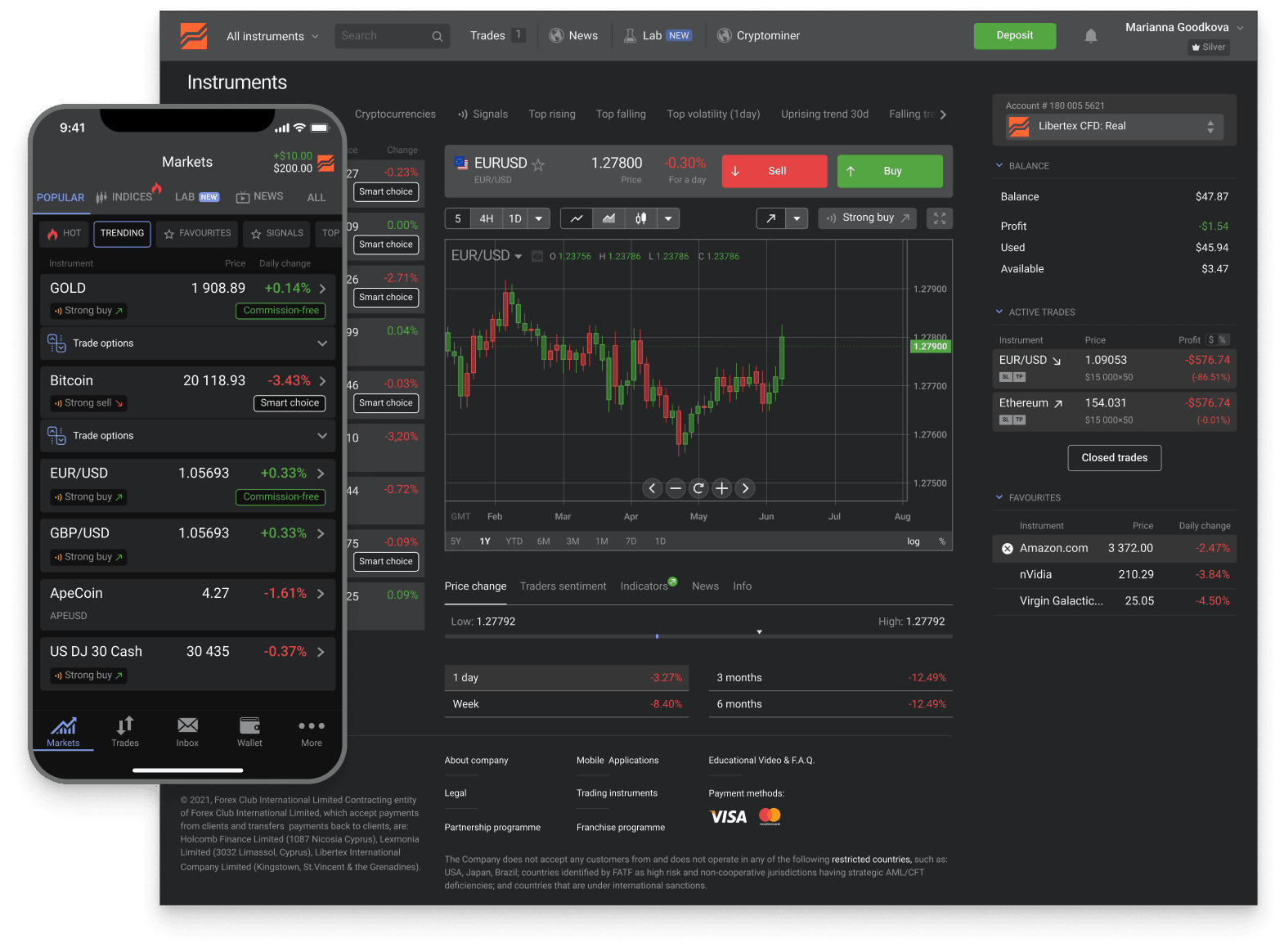
The Libertex web platform
Libertex online is a full trading terminal right in your browser — nothing to download, works from any computer. Open an account in minutes and trade global markets.
Trusted
- downloads
- 15M+
- reviews
- 25K+
- years
- 26+
- countries
- 120+
across iOS and Android
App Store + Google Play
in global markets
served worldwide
Industry recognition

Most Trusted Broker
2024 · European CEO Awards

Best Global Broker
2025 · UF Awards

Best Online Trading Platform
2025 · Fintech Breakthrough

CFD Broker of the Year
2024 · Pan Finance
Web-specific strengths
Four advantages of the web version
Each advantage is a direct consequence of being browser-based rather than native-installed. None are about which is "better" — they're about which workflow each suits.
No installation, ever
Open the broker's URL, sign in, trade. No app store, no .exe, no .dmg, no Wine, no permissions dialog. Useful on devices you don't own (a hotel computer, a borrowed laptop) where you wouldn't want to install software anyway.
Instant updates
Every time you load the page, you get the latest version of the platform. No App Store update prompts, no Windows installer to re-run, no version-skew between you and the broker. Web is always current — sometimes the same morning a feature ships.
Works on any modern OS
Windows, Mac, Linux, ChromeOS, BSD — if you have a modern browser, you have the web platform. The only operating system with no native Libertex app option is Linux, and the web platform makes that completely transparent.
The most feature-complete native surface
The web platform has more screen real estate than mobile and more native-Libertex features than MT4 / MT5. For analysis-heavy workflows (multiple charts, indicator overlays, position-management screens), web is the canonical desktop surface.
At a glance
Web platform — quick spec
The details most users want to confirm before deciding between web, app, or MetaTrader. Live behaviour is on the broker's official platform — these are the durable reference numbers.
- Installation
- None — opens in any modern browser (Chrome, Edge, Firefox, Safari, Brave)
- Operating systems
- Windows 10/11, macOS, Linux, ChromeOS — any OS that runs a modern browser
- Login
- Email + password, or single-sign-on via the parent account; biometric login is mobile-only
- Instruments
- All 1,300+ Libertex CFD instruments — same coverage as mobile app and live account
- Order types
- Market, limit, stop, with stop-loss and take-profit on every order
- Charting
- Built-in charts with core timeframes, drawing tools, and standard indicators — fewer than MetaTrader, sufficient for most discretionary trading
- Custom indicators
- Not supported — MQL4 / MQL5 indicators run on MetaTrader sub-accounts only
- Expert Advisors (EAs)
- Not supported — automated trading runs on MetaTrader sub-accounts only (MT4 / MT5)
- Multi-tab / multi-monitor
- Multiple browser tabs and windows are supported; positions and balance stay synchronised across all open instances
- Sync with mobile app
- Same account login — positions opened on web are visible on mobile and vice versa in real time
The web platform handles the standard CFD-trading workflow entirely. For algorithmic trading, custom indicators, or specific MetaTrader-only tools, use the MT4 or MT5 sub-account from the same Libertex account. For on-the-go execution, the mobile app complements the web as a secondary surface.
Web compared
Web vs mobile vs MetaTrader
Five dimensions where web differs from the alternatives. None of these are absolutes; they're tendencies that fit different trader workflows.
- Installation
- Web: none. Mobile: store install. MT: download from broker
- Screen real estate
- Web: highest. Desktop MT: second. Mobile: smallest
- Feature density
- Web: highest native. MT: highest power-user. Mobile: compact
- Custom indicators
- Web: built-ins only. MT: thousands. Mobile: built-ins only
- Best for
- Web: most users. MT: algo / power. Mobile: on-the-go
Web wins on simplicity and updates; MetaTrader wins on customisation depth; mobile wins on convenience. All three connect to the same Libertex account and execute through the same broker matching system — the choice is about workflow density, not about underlying capability.
Related
Where to read next
Three pages cover the surrounding context — the official-site / anti-phishing version of this story, MetaTrader for power-users, and the demo to evaluate before depositing.
Libertex on Windows
Windows-specific options for running Libertex — web platform in Edge / Chrome / Firefox, MT4 / MT5 native Windows clients (MetaTrader's home platform), antivirus considerations, Windows 10 and 11 support. The most common desktop scenario for Libertex traders.
Windows guideLibertex on Mac
macOS-specific options — web in Safari, MT4 / MT5 native macOS builds, Apple Silicon considerations.
Mac guideVerify the official site
Anti-phishing checklist for finding the genuine Libertex login: HTTPS with a valid lock icon, the official domain spelled correctly, the broker's regulator and license number visible, and no passwords requested by email.
Anti-phishing checklistMetaTrader 4 desktop
The alternative to web for traders who want Expert Advisors, custom indicators, and the MetaTrader workflow. Windows and Mac native builds.
About MT4Try on demo
The web platform runs the $50,000 demo natively — same browser-based experience, no real money. Best way to evaluate the web version specifically.
Demo account
FAQ
Web platform questions
Next step
Open your account and trade right in the browser
Open an account in minutes and trade in the web terminal from any computer — nothing to download or install. Want to try risk-free first? Open a demo.
Trading in financial instruments is a risky activity and can bring not only profits, but also losses. The amount of possible losses is limited by the amount of the deposit.